
Why VPNs Are a Must for Remote Workers
Remote work is the dream for many professionals: pajamas all day and zero morning traffic.
It is also riskier than you might expect, especially for your online privacy and data security.
If you’re a remote worker, or a business owner managing a remote team, there’s one tool in your “digital survival kit” you can’t overlook: a VPN.
What Is a VPN, and How Does It Work?
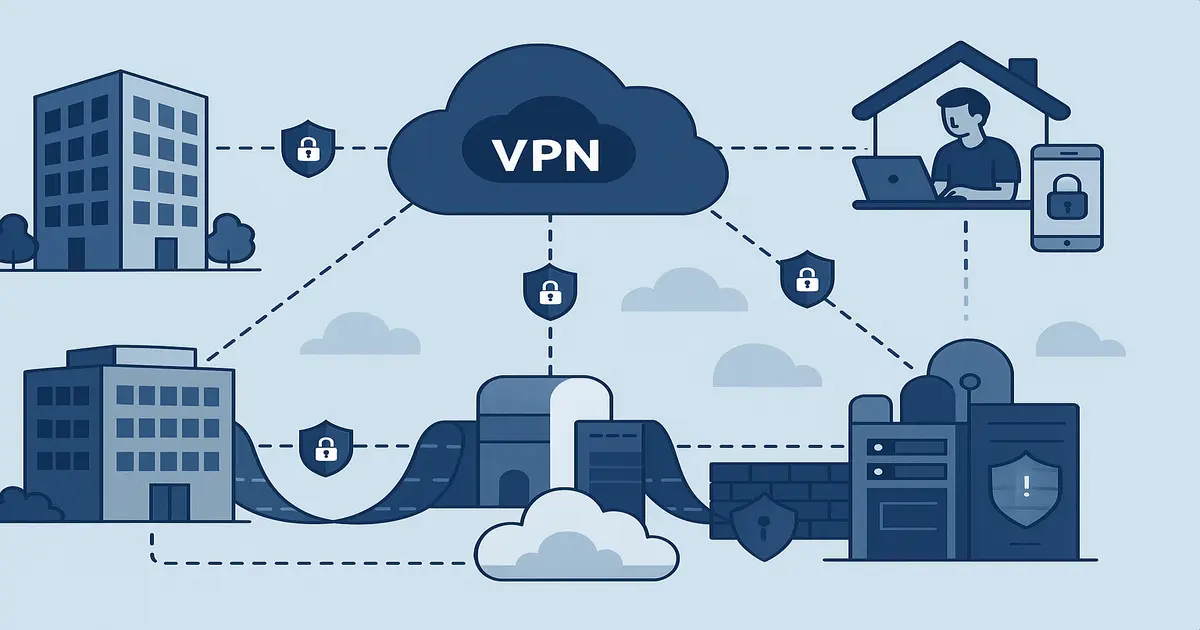
Picture the internet as a highway. Without a VPN, everything you do online travels on that highway completely exposed, from the sites you visit to the messages you send and the data you download. It’s like driving a convertible with all your stuff in plain sight.
A VPN (Virtual Private Network) is like a secure tunnel through that highway. It encrypts your data and hides your IP address. That makes it much harder for hackers, advertisers or even your internet provider to see what you’re doing.
A VPN works like a bodyguard for your internet connection.
Why Remote Workers Need VPNs
You may be thinking, “I work from home. Isn’t my Wi-Fi secure enough?” Your home network is only part of the picture.
1. You Use Public Wi-Fi
If you’ve ever worked from a coffee shop or an airport, you’ve used public Wi-Fi. It’s convenient, but it’s often a hacker’s playground.
Without a VPN, logging into your work email or opening company files on public Wi-Fi is like whispering classified info at a crowded table. Anyone with basic hacking tools can "eavesdrop" on your connection.
A VPN encrypts your data, even on public Wi-Fi, which makes it virtually unreadable to prying eyes.
2. You’re Accessing Company Resources Remotely
If your company gives you access to internal databases, shared drives or cloud apps, you’re probably handling sensitive information that should not be floating around unsecured.
Many companies set up VPNs to give remote employees secure pathways into their network. With a VPN, you connect to company resources as if you were inside the office, even though you’re on your living room couch.
3. You Need to Protect Client or Personal Data
If you’re a freelancer, consultant or business owner, you handle sensitive data, such as client contracts, billing info, intellectual property or even passwords.
An intercepted message could be a disaster. A VPN keeps the data you exchange for your eyes only.
When you send an invoice or log into a client database, the VPN wraps that traffic in encryption and keeps it private.
4. Avoid Location-Based Restrictions
Say you’re working on the road and need a service that isn’t available where you are, such as a website or business tool blocked in that region.
A VPN can spoof your location so you can browse as if you’re back home. You keep full access and stay productive wherever you travel.
5. You Like Your Privacy
Even if you’re only browsing innocently or attending Zoom calls, your data is still vulnerable.
Internet Service Providers (ISPs), search engines and advertisers are all tracking what you do online. Only a VPN can help mask your IP address, which shrinks your tracking footprint and protects your right to privacy.
Risks of Not Using a VPN While Working Remotely
Skipping VPN protection has some unpleasant consequences:
- Unsecured data transfer: Emails, invoices and login credentials are all exposed.
- Targeted cyberattacks: Hackers actively scan for weak or unprotected connections.
- Data theft: Personal info, client records or company secrets can be stolen mid-transmission.
- Company liability: Exposing customer or employee data without adequate protection can have legal ramifications.
- Financial loss: Compromised financial info or ransomware attacks can cost thousands.
Working without a VPN is like leaving your front door wide open with a sign saying, “Help yourself.”
Features to Look for in a VPN
Choosing a VPN can feel like shopping for a new phone, with lots of options and techy terms. Here’s a simplified cheat sheet:
Strong Encryption
Look for AES-256 encryption, the gold standard. It locks your data up like Fort Knox.
No-Log Policy
A trustworthy VPN should promise not to store or track what you’re doing online.
Worldwide Servers
More servers mean a faster, more reliable connection. They also help you access content from different regions.
Fast Speeds
Some VPNs slow you down more than others. Pick providers known for a minimal drop in speed.
Multi-Device Support
You probably work across a phone, laptop and tablet, so get a VPN that works on all of them.
Active Kill Switch
If the VPN drops unexpectedly, a kill switch immediately shuts off your internet to prevent unencrypted data leaks.
Some top-rated VPNs are NordVPN, ExpressVPN, ProtonVPN and Surfshark.
Bonus Round: VPNs for Business
Solo freelancers aren’t the only ones who need VPNs. Small and large businesses depend on them too.
If you’re an entrepreneur or team manager with remote employees:
- Set up VPN access for the whole team
- Make sure everyone uses it when accessing the company’s digital tools
- Combine it with two-factor authentication (2FA) for even stronger security
Many business VPNs also come with admin dashboards that let you enforce security protocols, monitor usage and restrict access to sensitive areas.
Common Misconceptions About VPNs
“Isn’t a VPN illegal?”
No. VPNs are legal in most countries (though restricted in a few). Many industries require them for compliance reasons.
“Won’t it slow down my internet speed?”
A little, but most top VPNs keep the slowdown small. That tradeoff is worth the privacy protection.
“Isn’t my antivirus enough?”
Antivirus protects against malware. It doesn’t secure your internet connection. Think of VPNs and antivirus software as teammates.
VPNs Are the Work-From-Home Capes We All Need
Working remotely is here to stay. That freedom comes with responsibility for protecting your data and your clients’ trust.
A VPN is one of the easiest and most affordable ways to stay safe online while working from anywhere. It’s also one of the most effective.
It’s a small addition to your digital toolkit that makes a big difference to your data’s safety.
Quick Recap
- A VPN encrypts data and keeps your location hidden.
- Remote workers need one when using public Wi-Fi, company emails or sensitive files.
- It protects your privacy and shields you from hackers. It also bypasses geo-blocks.
- Look for strong encryption, fast speeds, a kill switch and a no-logs policy.
- Use a VPN throughout your remote work, especially if you’re handling confidential data or team communications.